
Initial Layer Flow Ratio - Calibration Test




Print Profile(4)


Description
This is a series of print profiles to test your 1st layer flow ratio if you are having issues with a low quality 1st layer. There is a profile for 0.2mm, 0.4mm, 0.6mm, and 0.8mm nozzle sizes. Be sure to use the correct print profile for the nozzle size you are using.
When I first bought the Smooth PEI plate from Bambu, I was getting a terrible 1st layer, but this can be useful for any plate type. It was bumby and bubbly and was way worse with a 0.2mm nozzle (see the attached photos for examples from various people with the same issue). It took me a decent amount of research to figure out the problem. I found the ability to modify the “Initial layer flow ratio” through the “Develop Mode” settings in Bambu Studio. Changing this value will ratio the extrusion rate for the 1st layer in the print only. So, assuming your filament is calibrated properly, this gives you a perfect 1st layer so you have a great print from the bottom to the top. Be sure your plate is clean and you have no other issues going on.
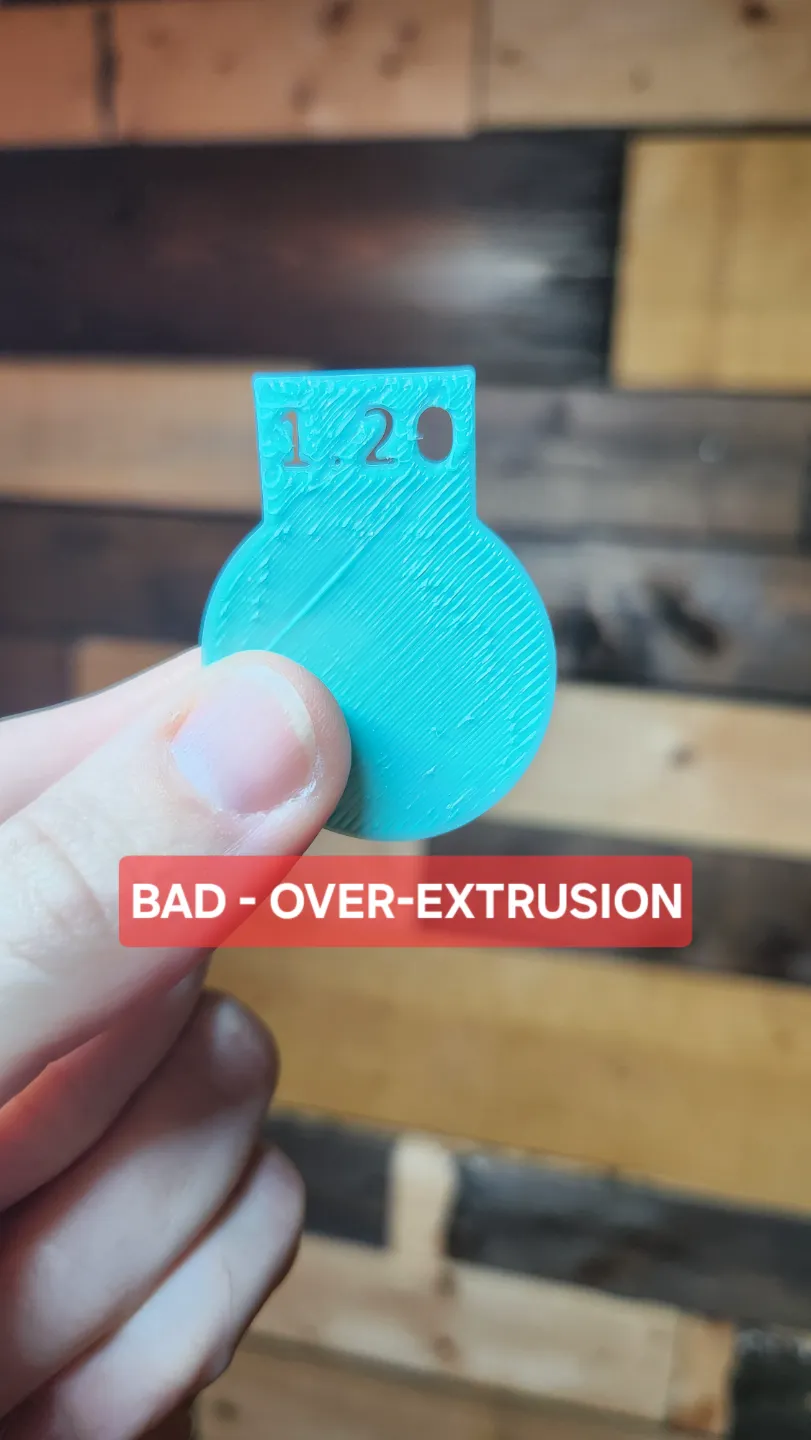
Once you print the correct profile on your selected plate type, pick the piece that has the smoothest center but also doesn't have split lines in the print. You should gently peel up the pieces you think are close and hold them up to a light. You can see in my photos attached, the 0.65 is severely under-extruded, the 1.20 is severely over-extruded, and the 0.90 is smooth and glossy in the middle. If you are unsure between two of them, it is better to pick the one with a slightly higher number to ensure you don't have under-extrusion. Now, whenever you print with that nozzle size on that plate, be sure to adjust the “Initial layer flow ratio” in the settings to make sure you get an excellent 1st layer.
I found a few models online, but I didn't really like any of them and I wanted to offer different nozzle sizes and also label the printed pieces for ease of identification after you peel it up.
Here are some easy-to-follow instructions.
Navigate to the preferences in Bambu Studio, scroll to the bottom, and check “Develop mode”

Now you will have access to the “Initial layer flow ratio” setting in Bambu Studio

Print the profile for the nozzle size you are using - each printed piece corresponds to a different “Initial layer flow ratio” setting

IGNORE THE EDGES OF THE PRINTED CIRCLES - PAY ATTENTION TO THE CENTER OF THE CIRCLES

License

You shall not share, sub-license, sell, rent, host, transfer, or distribute in any way the digital or 3D printed versions of this object, nor any other derivative work of this object in its digital or physical format (including - but not limited to - remixes of this object, and hosting on other digital platforms). The objects may not be used without permission in any way whatsoever in which you charge money, or collect fees.


Comment & Rating (643)