


Print Profile(2)


Description
首先说一声抱歉,对前面下载文件打印,耽误大家时间说声对不起
First of all, say sorry for the previous download file printing, say sorry for the delay in everyone's time
由于做完模型,机子出现问题,没有打印验证就将模型上传,实在抱歉
As the model is finished, there is a problem with the machine, and the model is uploaded without print verification. I am really sorry
现在经过两个版本的更改,把切片文件进行了相应的修改,颜色分层有了最终的形态
Now after two versions of the change, the slice file has been modified accordingly, and the color layer has the final shape
从左到右依次是第一版到第三版
From left to right are the first to the third editions
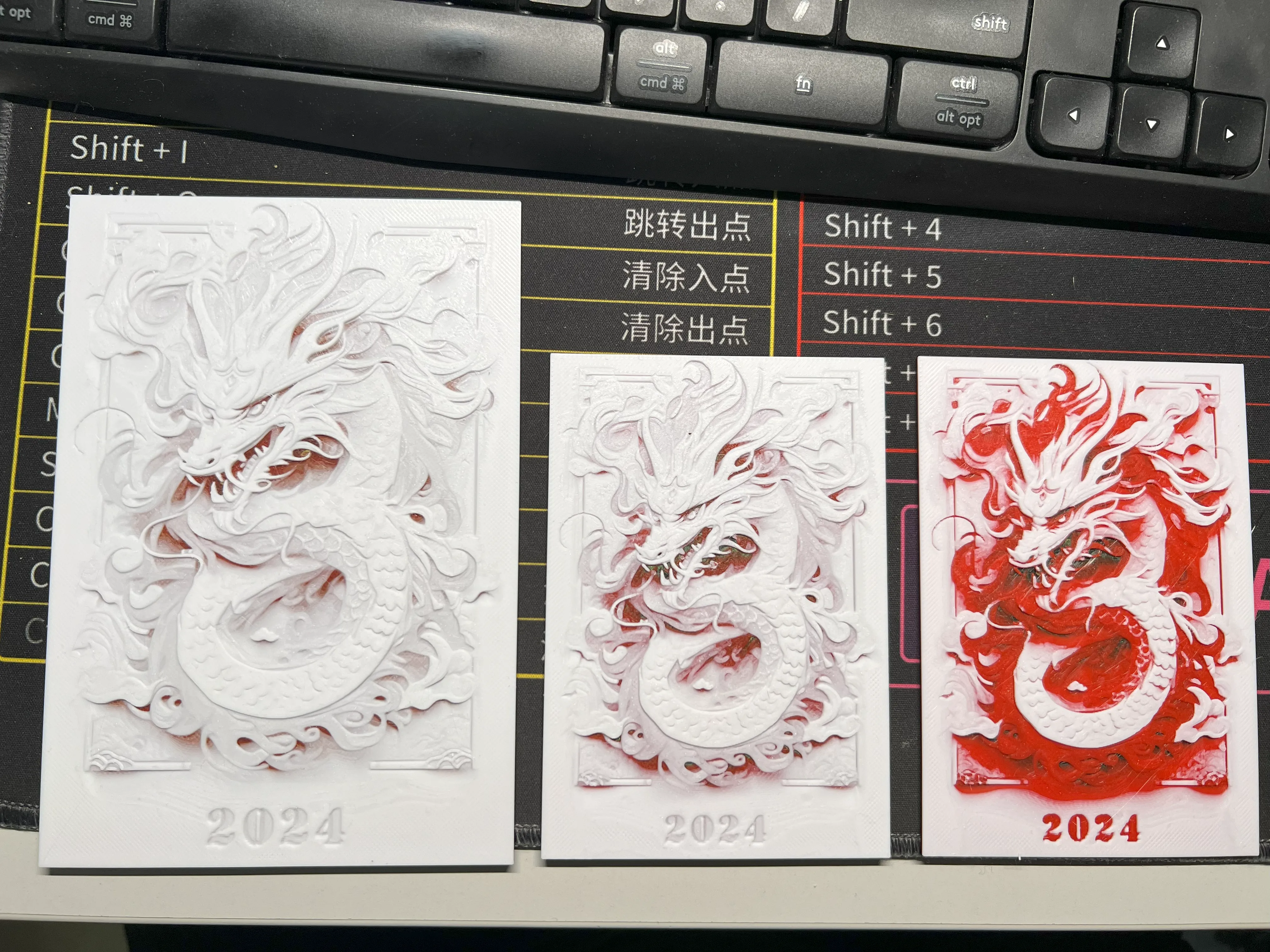
第三版在HF软件里的stl文件还是颜色有点问题,手动的将颜色层高改变了
The third version of the stl file in the HF software is still a little color problem, and the color level is changed manually
----------------------------------------------------------------------------------------------------------
原始的高度:
Original height:
Print at 100% infill with a layer height of 0.08mm with a base layer of 0.16mm
Filaments Used:
PETG JAYO Black Transmission Distance: 0.3
PLA+ Sunlu Pure Yellow Transmission Distance: 5
PLA+ Sunlu Red Transmission Distance: 6
PLA+ Sunlu White Transmission Distance: 5
!!!! It appears you have mixed filament types. Be certain this is what you want. !!!!!
Swap Instructions:
Start with Black
At layer #11 (0.96mm) swap to Pure Yellow
At layer #12 (1.04mm) swap to Red
At layer #19 (1.6mm) swap to White for the rest.
---------------------------------------------------------------------------------------------
更改后的高度:
Changed height:
Swap Instructions:
Start with Black
At layer #11 (0.96mm) swap to Pure Yellow
At layer #12 (1.04mm) swap to Red
At layer #31 (1.6mm) swap to White for the rest.
---------------------------------------------------------------------------------------
也就是让红色多一些能够显示出更多的细节,当然你也可以自己修改颜色的层高得到更好的效果
That is, let the red more to show more details, of course, you can also modify the height of the color to get a better effect
很感谢大家对我的批评和指正,谢谢大家的支持,我会更严谨的使用软件制作出模型,并测试后分享出来,谢谢大家!
Thank you very much for your criticism and correction, thank you for your support, I will use the software more rigorously to make a model, and test and share it, thank you!
利用MJ生成的剪纸浮雕图像
Using MJ generated decoupage relief image
在hueforge软件中生成模型文件
Generate model files in HueForge software
License

You shall not share, sub-license, sell, rent, host, transfer, or distribute in any way the digital or 3D printed versions of this object, nor any other derivative work of this object in its digital or physical format (including - but not limited to - remixes of this object, and hosting on other digital platforms). The objects may not be used without permission in any way whatsoever in which you charge money, or collect fees.


Comment & Rating (44)