
Customizable Wolf Den Door Sign (AMS/No AMS)
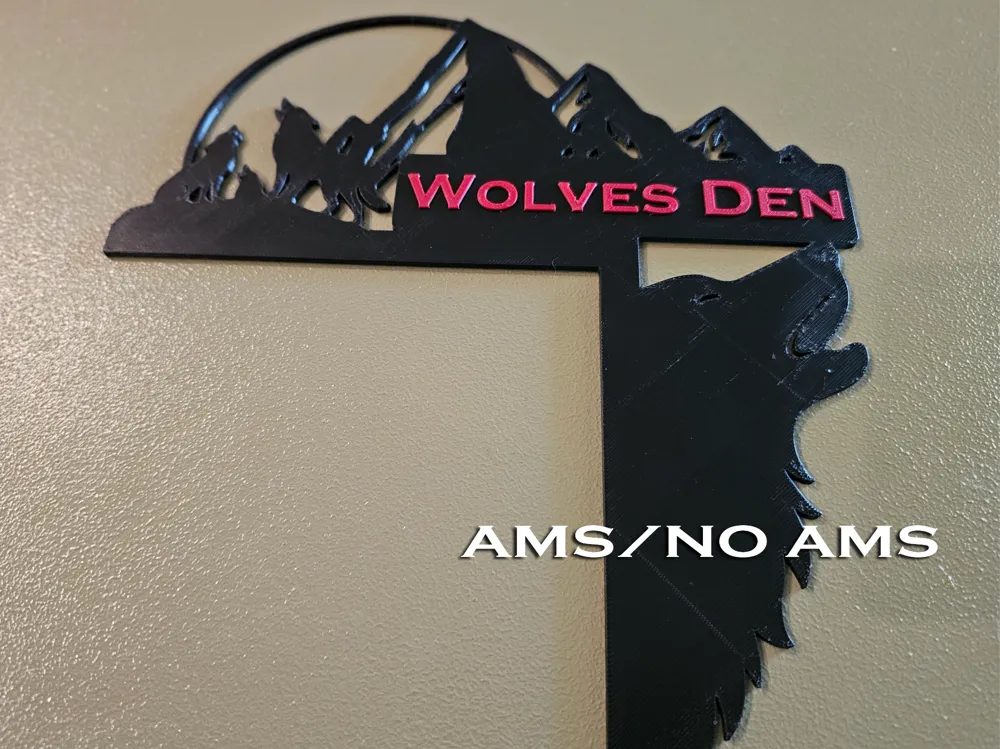
Print Profile(4)


Description
Boost Me (for free)
If you like it, why not? Free to you, helpful to me!
I made this for my little one, putting her name in for the print. She wanted to share it with everyone since the community has given her so many wonderful toys. I changed it up to handle anyone's name (e.g., “Bob’s Den,” “The Pack’s Hideout,” etc.) and tried my hand at different profiles for AMS/no AMS and the A1 mini.
The No AMS versions are just the same color filament as a negative part isn't editable (you can convert it between text and negative if you want to edit then enlay the text) and I wasn't sure how to do it another way. Also I designed my little one's with the font ‘inside’ the design so I could print it face down for improved quality. Ideas on either of these (and any constructive feedback) are welcome.
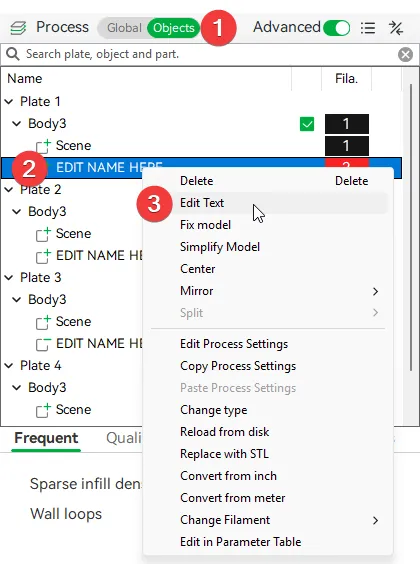
Personalize:
- Click Objects
- Right click EDIT NAME HERE
- Click Edit Text (Font used is Copperplate Gothic Bold).
Essential Print Prep:
- Clean your build plate with warm soapy water (so important to have a clean plate!)
- Make sure bed is properly leveled
- Use good first-layer adhesion (e.g., textured plate or glue stick if needed)
- Slice with the sign flat on the bed, no supports required
- Set up AMS or manual filament swap before printing if using multiple colors
- Verify filament temps and flow are dialed in for your material
I hope you like it as much as she did. :)
License

You shall not share, sub-license, sell, rent, host, transfer, or distribute in any way the digital or 3D printed versions of this object, nor any other derivative work of this object in its digital or physical format (including - but not limited to - remixes of this object, and hosting on other digital platforms). The objects may not be used without permission in any way whatsoever in which you charge money, or collect fees.


Comment & Rating (1)