
Magic: The Gathering Tarkir 2-2 Dragon Token
Print Profile(1)

Description
*Important print instructions towards the bottom*
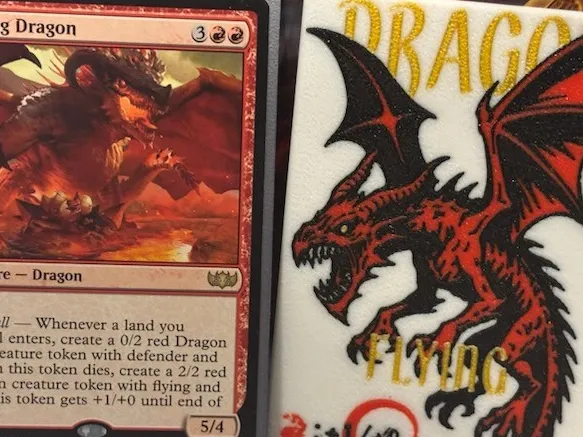
Custom 2-2 Dragon Creature Token
These are the tokens that get made by Nesting Dragon and the 0-2 Defender Dragon tokens. Be on the lookout for all of the other tokens in the Temur Roar precon.
- Sturdy: All of my tokens are 1.5mm thick, ensuring they last and are harder to lose.
- Standard Size: All of my tokens have the same height and width as a standard Magic: The Gathering Card, so they will fit in your deck boxes.
- Customizable: The image is embedded into the token, so it's easy to change the colors on each segment of the print. To be honest, this would look even better with a 5th color, so if you have more than 1 AMS, go for it!
- Quick to print: A single token takes less than an hour and a half with 4 colors and 1 AMS. A full plate of 6 tokens takes a little more than 5 and a half hours to print.
Boost Me (for free)
Like my designs? Consider sending me a boost. They keep me inspired to make more Magic: The Gathering accessories.
Want to sell physical copies of my prints? Subscribe to my Patreon for a commercial license!
Important Print Settings
Slice gap radius: .001
Wall generator: arachne
Initial Layer Width: .21mm
Initial Layer Speed: 20mm/s
Initial Infill Speed: 20mm/s
Bed Temp: 65C
Believe it or not this was printed with the .4mm nozzle. It's not easy getting the fine detail, but here's what worked for me. Make sure your plate is very clean. Set the initial layer width is set to .21mm, reduce the initial layer speed to 20mm/s and the initial layer infill speed to 20mm/s. Finally, make sure the print bed is 65C. The default temperature won't work. Equally important that you let the build plate cool completely before removing, the increased bed temp means that if you try to pull it before it's cool, the print will bend and warp.
License

You shall not share, sub-license, sell, rent, host, transfer, or distribute in any way the digital or 3D printed versions of this object, nor any other derivative work of this object in its digital or physical format (including - but not limited to - remixes of this object, and hosting on other digital platforms). The objects may not be used without permission in any way whatsoever in which you charge money, or collect fees.


Comment & Rating (2)