Search models, users, collections, and posts

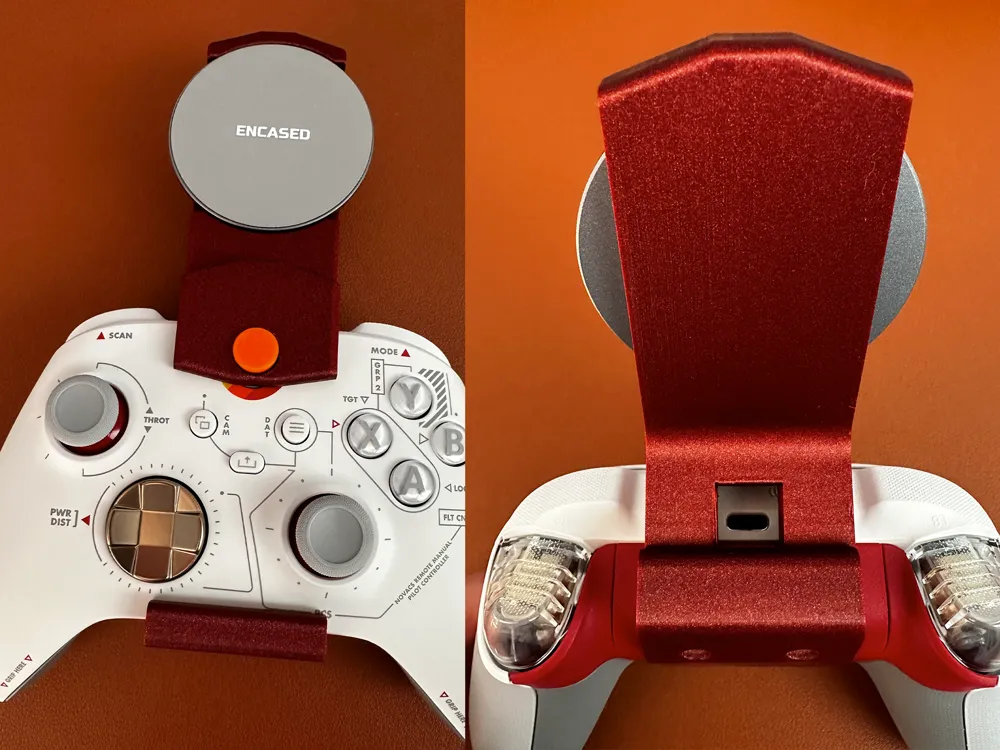
MagSafe iPhone holder/clip for Xbox controllers
IP Report

Print Profile(1)

0.2mm layer, 2 walls, 15% infill
Designer
58 min
1 plate
Open in Bambu Studio
Boost
22
42
1
1
54
29
Released
Description
Features
- Prints on its side with minimal support (can be made stronger easily with more walls)
- Fits the contours of current gen Core controllers tightly, no wobble in any direction
- Opening for charging port
- Covers the Xbox button to reduce glare (since playing this way you're looking directly at it)
Required Materials
- ~57mm MagSafe magnet puck
- 2x M3 brass inserts
- 2x M3x8 screws
- Small strip of thin grip/foam tape (optional)
Assembly
- Set brass inserts into top piece (the one with the support)
- Force button all the way into the slot in the top piece, it should be captive but still movable up and down
- Hook bottom piece onto the controller, and screw in the top
- Optionally, add foam tape to adjust if the fit is not perfect
- Tape the magnet
License

This user content is licensed under a
Creative Commons Attribution-Noncommercial-Share Alike


Comment & Rating (1)