Search models, users, collections, and posts

10" Rack Mount for Power Bar | Lab Rax
IP Report
Print Profile(1)

0.2mm layer, 2 walls, 15% infill
Designer
2.7 h
1 plate
Open in Bambu Studio
Boost
44
196
8
3
88
27
Released
Description
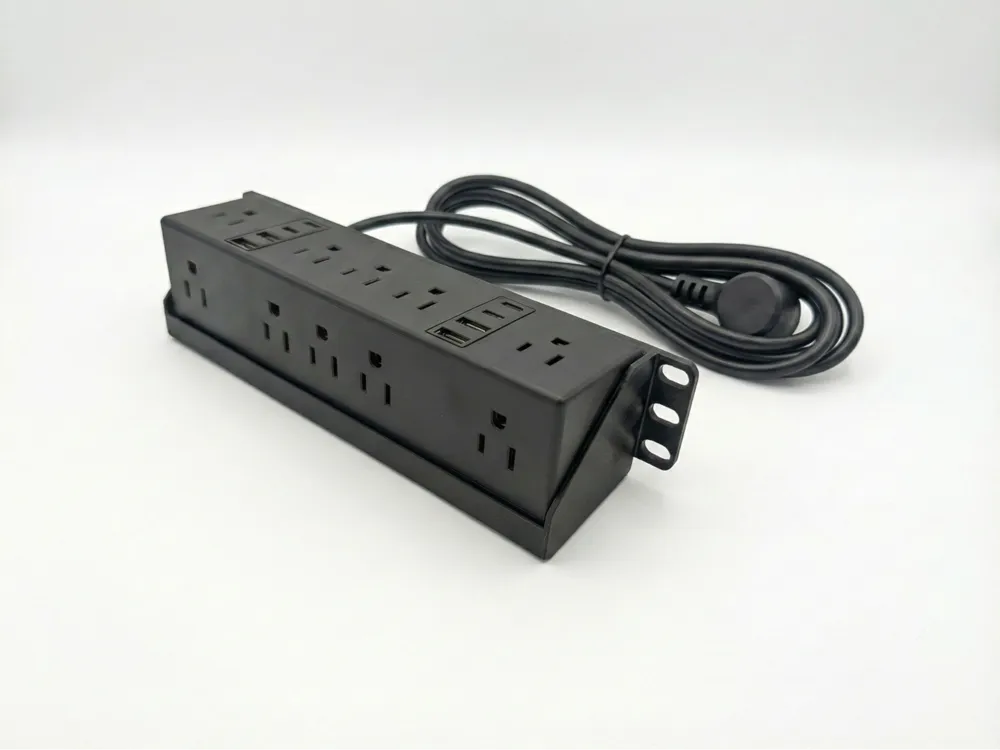
2U Rack Mount for 10" PDU (Desktop Model Conversion) This model is a dedicated rack-mount housing designed to convert a standard desktop PDU into a sleek, rack-mounted power solution for 10-inch racks. Specifically designed as part of the Lab Rax series, this mount is intended to sit at the very bottom of the case to maximize vertical space.
Compatible Hardware: Desktop PDU with USB (Amazon Canada)
Design Details
- Space Optimization: This mount is designed to sit at the very base of the Lab Rax case, utilizing the often-unused space at the bottom of the rack. You can place it higher on the case but it will take up the ~1/2U below itself.
- Vertical Footprint: Note that this unit occupies 2U of vertical space to accommodate the height and plug clearance of the PDU.
- Integrated Look: Single cable coming out the back of the rack makes for a clean setup.
- Part of a series: The profile is the same thickness as the other front face plates in my collection to look seamless.
Print Settings
- Material: PLA or PETG (PETG is recommended if your rack environment gets warm).
- Infill: 15% - 20%
- Supports: Yes
- Wall Loops: 2
Installation Instructions
1. Prepare the PDU
The PDU comes with a desk clamp that must be removed for this mount:
- Unscrew the baseplate of the PDU to access the internal screws holding the clamp mechanism.
- Remove the clamp and reassemble the PDU base.
2. Insert the PDU
- Pass the cable through the hole in the back of the mount
- Seat the PDU into the mount by rotating and pressing into the seat. It may require a little bit of flex to get past the lip.
3. Rack Assembly
- Placement: Install this at the very bottom of your Lab Rax.
- Ventilation & Aesthetics: It is highly recommended to print 3 of my 1U Vent Cover to cover the front of the rack. One vent should be placed in the 1U space directly above the PDU to provide a clean finish.
- Cable Management: Consider the fact that you need access to plug and unplug when installing units on top of the PDU. I recommend keeping at least 2U above the PDU clear for access.
Boost Me (for free)
If this print helped organize your homelab, a Boost is greatly appreciated and helps me bring more designs to the community.
License

This user content is licensed under a
Creative Commons Attribution-Noncommercial-Share Alike


Comment & Rating (8)