
Cable clamps/clips


Print Profile(3)


Description
Few minutes of printing to tame your cable monster. I uploaded MANY variations in the zip file.
Basic variations are uploaded as models, all of the other ones are in the Zip file.
Zip file contains all variations in folders in multiple levels: thickness/width/cablesize/.
For example if you need large, clip for 10mm cable, you can go inside folder “thickness_1_29” inside it is “width_20”, in which is folder “cable_10” and there you can choose which lip size you want.
Note that clips with thickness 2.19 are quite stiff, IMHO the 1.29 thickness is ideal.
Hole for screw is 4 mm or 1/8".
All clamps have slightly rounded edges to reduce the possibility of damage to your precious cables.
Before you ask:
I chose hexagonal holes for screws because I noticed many people have issue with vertical round holes.
If you need other sizes or dimensions, just ask in comments. I got you. ❤️
TODO:
- I'll make version for 2 screws to hold cable where you want to.
Printing instructions
PLA is totally fine, but PETG is better as it's more flexible
Pretty much use standard 0.2 mm standard profile.
I recommend to use glue if you are printing thin ones without brim with PLA. Test one before printing large amount ;)
Filename
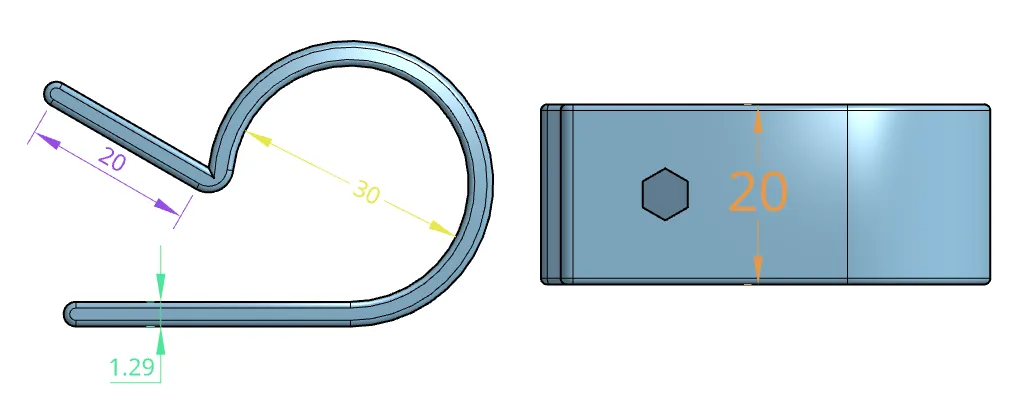
Model filename contains all dimensions:
th1_29_w20_cable30_lip20.stl
th1_29 - material thickness
w20 - clip width
cable30 - space for cable (diameter of inside hole)
lip20 - lip where screw hole is (I actually have no idea how it's called properly, sorry)
Color matched dimensions for better visualisation:
Wall thickness
Material thickness, higher value means more stiff and more durable cable clip. I tried to match default line width settings for 0.4 standard nozzle size.
Variations:
- 0.84mm (th0_84) for 0.4 nozzle: 2 walls printed
- 1.29mm (th1_29) for 0.4 nozzle: 3 walls printed
- 2.19mm (th2_19) for 0.4 nozzle: 5 walls printed
Width
Clip size. Choose larger one if you need to direct cable somewhere.
Variations:
- 8 mm (5/16")
- 12 mm (~1/2")
- 16 mm (5/8")
- 20 mm (~13/16")
Cable size
Size of hole/arc. Space for cable. Room for conduit. You name it.
Variations:
- 4 mm (1/8")
- 5 mm (3/16")
- 6 mm (~1/4") - should fit Cat6 regular UTP (unshielded) cable
- 8 mm (5/16")
- 10 mm (~3/8")
- 15 mm (~5/8")
- 18 mm (~3/4")
- 20 mm (Just short of 13/16")
- 25 mm (1")
- 30 mm (1 3/16")
Lip
If cable is sturdy, choose smaller lip as it should hold cable closer to the place of attachment. Holding larger lip is better (at least with my fat fingers).
Variations:
- 15 mm (~5/8")
- 20 mm (Just short of 13/16")
If you want to identify cables by clip I can think of three possible variants:
1. choose large lip and add text in the slicer.
2. put sticker on the lip and write on that with sharpie (sharpie directly on the print will result in smudge)
3. write on the lip with oil based tech pen.
License

You shall not share, sub-license, sell, rent, host, transfer, or distribute in any way the digital or 3D printed versions of this object, nor any other derivative work of this object in its digital or physical format (including - but not limited to - remixes of this object, and hosting on other digital platforms). The objects may not be used without permission in any way whatsoever in which you charge money, or collect fees.


Comment & Rating (69)