
The Bin-erator (Drawer Bin Generator)


Print Profile(1)

Description
Updates
2024/07/20 - Added option for radius to be inside only, so that sharp external corners can be maintained. Added a base bevel option that creates inner and external bevels if needed to fit certain drawers and boxes.
2024/07/19 - Added option for box radius to be internal only, so the outside can stay a sharp corner if desired. Added option for a base bevel and reorganized the base settings a bit.
2024/07/03 - Added optional base radius between the base and walls, and option to have a larger radius at the four perimeter corners of the drawer without that same radius everywhere. .
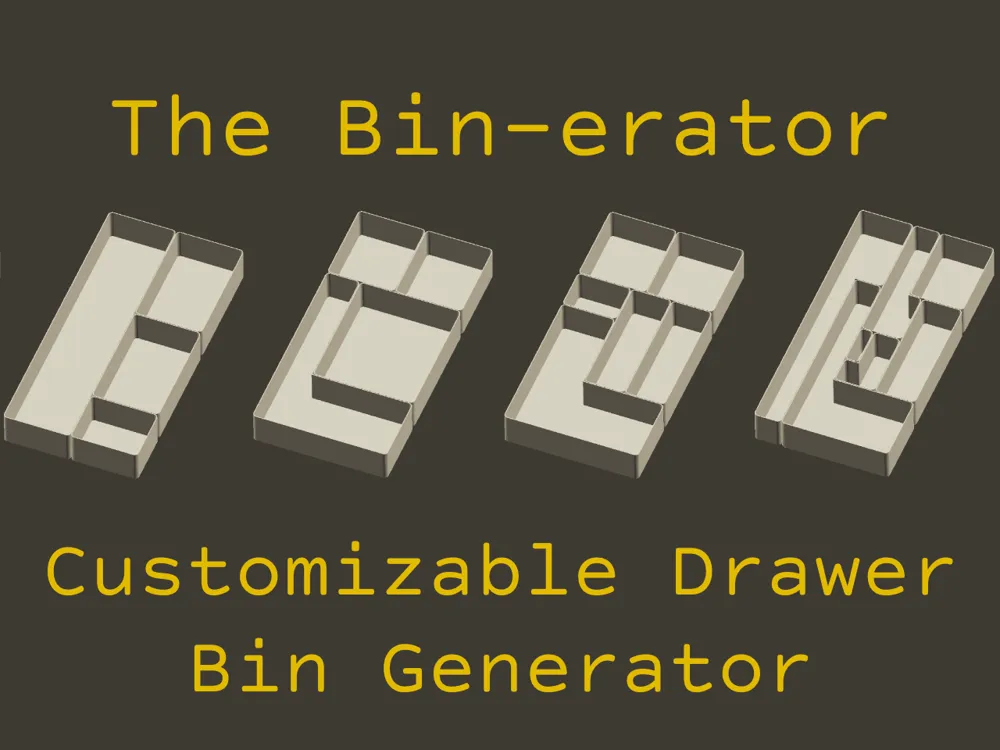
This Bin Generator can automatically divide a drawer, box, etc. into perfectly sized bins
While you can make a simple grid, you can also divide into rectangles of different sizes or more complex shapes to suite your needs.
Here are some examples of how you can control and divide the space from simple to complex:

Go ahead and try it out by hitting the customize button or read on below for more information.

Inputs:
- Size of drawer (or box, or whatever) in X and Y
- desired depth/height of bins
- adjust divide points, and cut direction one at a time
- divide points are positioned in X and Y using sliders
- if you need exact sizes you will have to do a bit of math to double check the size of the bins.
- cut direction at each divide point can be set to: Left, Right, Both, or To Next in either L/R direction (X) or Up/Down (Y)
- Order of operations matters If using the To Next option. Divide 2 will be able to stop at one of the cuts of Divide 1, but not at the cuts of Divide 3
- See below for an example setup
- divide points are positioned in X and Y using sliders
- Adjust remaining parameters such as:
- base thickness
- wall thickness
- radius (all corners)
- gaps between each bin
- stackable option
- base radius option and size
- base bevel option
The bins themselves are simple: a flat base with rounded corners and a wall, and an optional radius between the base and wall.
You can turn on the “stackable” setting, which will create an inset base. This will not work if you have too small of a corner radius (limit depends on the wall thickness…6mm radius is ok for 1.2mm wall thickness) or if your divided shape is too complicated, and it will increase processing time.

If you make stackable bins, of course you must make the one on top the same size as the one below, or the same size in one direction and smaller in the other direction.
If you wish to use more as an organizer insert (rather than a bunch of individual bins) and print as one piece, make the gap really small and check the option for the corner radius to be internal only.
Printing:
- Download the customized files from the MakerWorld OpenSCAD implementation, or use your own OpenSCAD install to output files.
- Split the model into objects and then you can move each bin around seperately and arrange on plates
- (right click on the model → "split" → “to objects”)
- If any bins are too big to fit on the print bed, you can use the cut feature in the slicer to divide or go back to the customize and edit the size.
- You can download my print profile to copy my settings, but generally nothing special is needed
- high layer height ok (I use 0.28mm extra draft)
- Stackable bases version has angled overhangs so no supports are needed.
Example:
Here is an example with four divide points and the cut options specified.

License

You shall not share, sub-license, sell, rent, host, transfer, or distribute in any way the digital or 3D printed versions of this object, nor any other derivative work of this object in its digital or physical format (including - but not limited to - remixes of this object, and hosting on other digital platforms). The objects may not be used without permission in any way whatsoever in which you charge money, or collect fees.


Comment & Rating (153)