
Label generator Gridfinity box


Print Profile(1)
Description
Boost Me (for free)
Your boost is completely free but helps me continue developing free, high-quality 3D printable solutions for everyone. Thank you for your support! 🙏
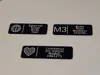
This fully customizable label model is designed specifically to fit the Gridfinity Storage Box by Pred, offering a convenient solution for easily labeling and organizing your Gridfinity storage setup. With the customize button, you can effortlessly adjust the model’s dimensions, logos, and text styles to suit your needs.
Check out the new Customizable bin labels
Changelog:
- REV1.1: Hardware image support added for your different Bolts, nuts and more! Also flat / extruded text option added! & UI improvements.
- REV1.2: Filters out empty text rows and vertically centers the rows. Thank to @LongracksLabs
- No logo option added
Key Customization Options:
- Size Customization: Adjust the label’s size via the Y_units setting, with options like 4, 5, 7, and 8 units, ensuring a perfect fit with the Gridfinity storage system.
- Logo Choice: Select an emoji or character logo for the left side. Choose from popular emojis or special characters, like @ or M3, for a personalized touch.
- Text Content: Enter desired text labels for each section (e.g., "Bolts," "Nuts") with up to four lines.
- Font and Style: Choose from various fonts, including Noto Sans and Roboto, and styles like "Bold" or "Italic" for a tailored look.
- Additional Settings: Customize the width, height, corner radius, and even add a chamfered edge for a polished finish.
Printing Recommendations:
- I used a 0.4mm nozzle for my prints, but for the best results, especially on finer text, a 0.2mm nozzle is recommended.
- To achieve a beautifully textured finish on the text, you can rotate the model 180 degrees so the text faces the build plate.
- Note that Bambu Studio’s “Lay Flat” feature may not position the model correctly; manually rotating it 180 degrees is recommended for optimal orientation.
Extra Options: Add a visual divider line next to the logo to clearly mark different sections. This model is perfect for use in workshops, hobby rooms, or storage spaces, keeping your Gridfinity storage boxes well-organized and visually streamlined.

Membership
💼 Want to sell these models? Get a commercial license! Support my work and unlock commercial rights to sell these models. Perfect for makers who want to turn their passion into profit! 🚀
License

You shall not share, sub-license, sell, rent, host, transfer, or distribute in any way the digital or 3D printed versions of this object, nor any other derivative work of this object in its digital or physical format (including - but not limited to - remixes of this object, and hosting on other digital platforms). The objects may not be used without permission in any way whatsoever in which you charge money, or collect fees.


Comment & Rating (54)